
Last updated: November 2026
Answer engine optimisation (AEO) is the work of getting your business named and cited when people ask AI tools like ChatGPT, Perplexity and Gemini for recommendations. This guide covers two HubSpot tools for assessing and tracking your brand's AI visibility. The free AI Search Grader, also called the AEO Grader, gives a one-off score out of 100 for how AI engines represent your brand. HubSpot AEO, the paid tool, tracks prompts you choose over time and suggests what to fix. For most B2B teams, the grader is the place to start.
What is AEO?
Answer engine optimisation (AEO) is the practice of structuring your content and brand presence so AI assistants mention and cite you in their answers. It sits alongside SEO rather than replacing it. Many AI tools still search the web to build their answers, so pages that rank well and answer questions clearly have a better chance of being used.
The difference is what success looks like. SEO aims for a click from a list of links. AEO aims for your brand to be named in the answer itself, often with a link to your page as the source.
What does the HubSpot AEO Grader measure?
HubSpot's free AI Search Grader, also referred to as the AEO Grader, gives you a one-time snapshot of how AI engines represent your brand. You enter your company name, location, product or service and industry, and results are ready in under two minutes. No HubSpot account is needed, though you complete a short form to see the full report.
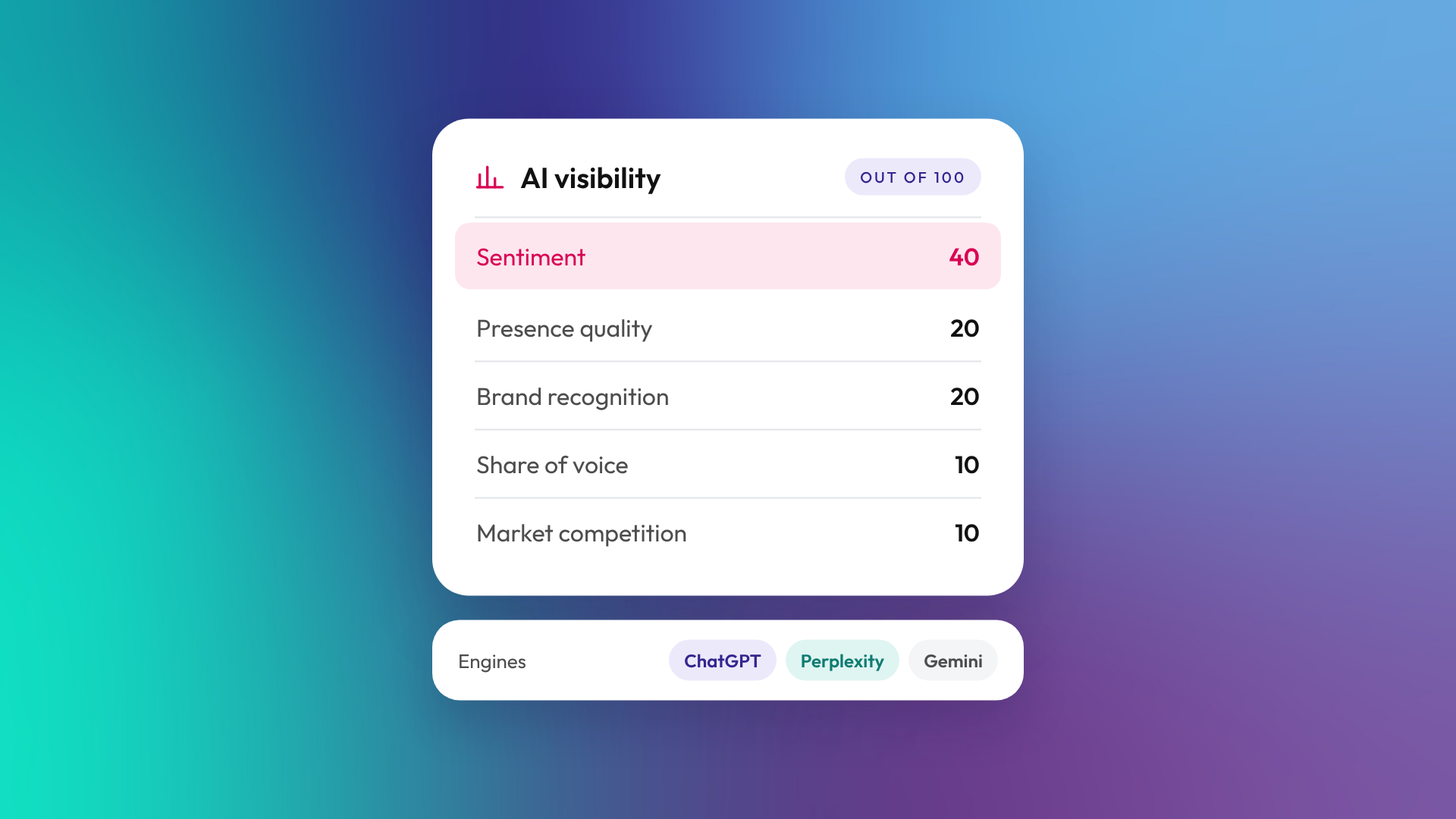
The grader runs preset queries across OpenAI's ChatGPT, Perplexity and Google's Gemini. HubSpot notes that the ChatGPT and Gemini results draw on the models' training data, while Perplexity uses live search. So it's a view of how AI engines see your brand, not an audit of your current website. It scores your brand out of 100 across five areas:
| Area | Points | What it looks at |
|---|---|---|
| Sentiment | 40 | Whether AI engines describe your brand positively |
| Presence quality | 20 | The depth of brand mentions, the quality of sources and the richness of available information |
| Brand recognition | 20 | Whether AI engines know who you are |
| Share of voice | 10 | How often you are mentioned compared with competitors |
| Market competition | 10 | Your perceived category role (leader, challenger or niche player) and innovation positioning |
What does paid HubSpot AEO add?
HubSpot AEO turns the one-off grader into ongoing tracking. Where the grader runs preset queries, AEO tracks the prompts you choose, the ones your buyers are likely to ask. It checks ChatGPT, Perplexity and Gemini by default, shows which websites AI engines are citing, compares your share of voice with named competitors, and gives prioritised recommendations.
AEO Multi-Engine, currently in beta, can add Claude, Google AI Mode and Google AI Overviews. According to HubSpot's AEO setup guide, these premium engines must be turned on separately, need enough answer capacity, and use twice as many answers per prompt as the default engines.
HubSpot lists standalone AEO at US$50 a month, or US$45 a month paid annually, with no other HubSpot subscription required. It's also included in Marketing Hub Professional and Enterprise. Standalone AEO and Marketing Hub Professional include 25 tracked prompts daily and 2,500 answers a month. Enterprise includes 50 prompts daily and 5,000 answers a month, and more capacity is available. If you already have Marketing Hub Professional, it's worth switching on before paying for a separate AEO tool.
How should you read your AEO Grader score?
Treat the score as a starting point, not a verdict. AI answers change between runs and between engines, so a single score is a snapshot of one moment.
The more useful parts of the report are the descriptions. Look for:
- Wrong or outdated facts about your services, location or size.
- Competitors named instead of you for services you offer.
- A vague description, which may indicate limited, inconsistent or unclear information about your business.
- Your category role. If you're described as a niche player in a market you lead, your content and third-party coverage may not be communicating that position clearly.
What should HubSpot users fix first for AEO?
Start with the pages that answer the questions your buyers ask before they contact you. These changes tend to help both AEO and SEO:
- Lead with the answer. Where appropriate, open each page and section with a concise, direct answer.
- Use question-led headings. Phrase H2s the way buyers ask, such as "How much does HubSpot cost in Australia?"
- Add tables and lists where they suit the content, such as comparisons, prices and steps.
- Use accurate, specific facts to make answers useful and verifiable.
- Add an FAQ section to service pages and guides, with short self-contained answers.
- Date your content. Add a "last updated" line and refresh prices and product details at least once a year.
- Keep your directory and review profiles current. AI engines draw on third-party sources, not just your own site.
None of these guarantees a citation. They make your information clearer and easier to verify, which is the part you control.
Can you track AEO results in HubSpot?
Yes, in two ways. HubSpot AEO tracks your visibility for the prompts you choose. HubSpot's traffic analytics can also identify visits referred from recognised AI tools. Where tracking and attribution are available, you can see whether those visits lead to enquiries and customers. This complements AEO visibility data, but it doesn't capture every AI mention or citation.
After setting up AEO, you can also use the HubSpot connector for ChatGPT or Claude to review AEO performance, manage tracked prompts and work with recommendations. A Super Admin must approve the connector. Generating content from AEO recommendations needs Marketing Hub Professional or Enterprise. HubSpot's guide to using AEO with the HubSpot connector covers setup and approval. For how the connector works more broadly, see our guide to the HubSpot MCP server.
Frequently asked questions
Is the HubSpot AEO Grader free?
Yes. HubSpot's AI Search Grader, also called the AEO Grader, is a free one-off check. You don't need a HubSpot account, but you complete a short form to see the full report.
Which AI engines does the AEO Grader check?
It checks ChatGPT, Perplexity and Gemini. HubSpot notes the ChatGPT and Gemini results draw on training data, while Perplexity uses live search.
How much does HubSpot AEO cost?
HubSpot lists standalone AEO at US$50 a month, or US$45 a month paid annually. It's included in Marketing Hub Professional and Enterprise.
Is AEO different from SEO?
Yes, but they overlap. SEO aims to rank pages in search results. AEO aims to have your brand named and cited in AI-generated answers, and good SEO often helps.
How often should I run the AEO Grader?
We suggest running it every quarter, or after a major content update. Results vary between runs, so look at trends rather than single scores. Paid AEO runs your tracked prompts daily, and HubSpot recommends judging trends over days or weeks.
Do I need new software for AEO?
Not to get started. You can start improving AEO with your existing content tools in HubSpot.
Want to know how AI engines see your business?
Run the free grader first. If the results raise questions about which pages to fix or how to track AEO in HubSpot, book a call and we'll talk it through.
